<?xml version="1.0" encoding="utf-8"?>
<?xml-stylesheet href="http://www.tres-graficos.jp/blog/rss/style.css" type="text/css"?>
<rdf:RDF xmlns="http://purl.org/rss/1.0/"
         xmlns:rdf="http://www.w3.org/1999/02/22-rdf-syntax-ns#"
         xmlns:content="http://purl.org/rss/1.0/modules/content/"
         xmlns:dc="http://purl.org/dc/elements/1.1/"
         xml:lang="en">
<channel rdf:about="http://www.tres-graficos.jp/blog/rss/1.0.php?id=627">
<title>TG BLOG</title>
<link>http://www.tres-graficos.jp/blog/index.php</link>
<dc:date>2011-10-05T11:52:03+0900</dc:date>
<description>
TG BLOG - RSS (RDF Site Summary).
</description>
<items>
<rdf:Seq>
<rdf:li rdf:resource="http://www.tres-graficos.jp/blog/article.php?id=627" />
</rdf:Seq>
</items>
</channel>
<item>
<title>WireFrame with Cheetah3D - Cheetah3D でワイアフレーム</title>
<link>http://www.tres-graficos.jp/blog/article.php?id=627</link>
<dc:date>2011-10-05T11:52:03+0900</dc:date>
<description>ワイヤフレームの質問を頂いたので、サンプルを作ってみました。


ポイントはワイヤフレームテクスチャで、スペキュラー／トランスパレンシー透明度・IORをそれぞれ設定してやる事ですね。
後、バンプマップで少しだけ立体的に仕上げてみました。
...</description>
<content:encoded>
<![CDATA[
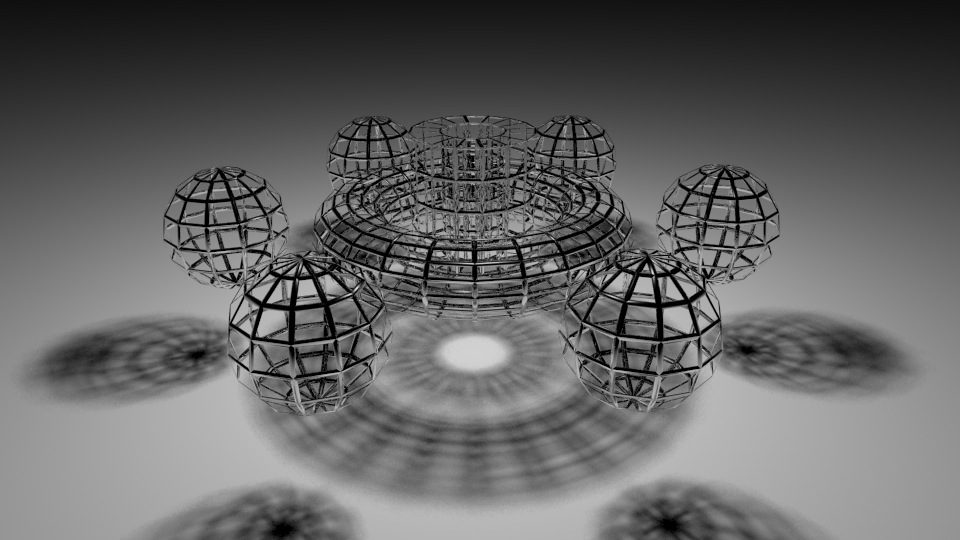
<p>ワイヤフレームの質問を頂いたので、サンプルを作ってみました。</p>
<p>
<img src="http://www.tres-graficos.jp/blog/resources/ch_20111005_wireMaterial.jpg" width="720" height="405" alt="ch_20111005_wireMaterial.jpg" />
</p>
<p>ポイントはワイヤフレームテクスチャで、スペキュラー／トランスパレンシー透明度・IORをそれぞれ設定してやる事ですね。<br />
後、バンプマップで少しだけ立体的に仕上げてみました。</p>
<!-- more -->
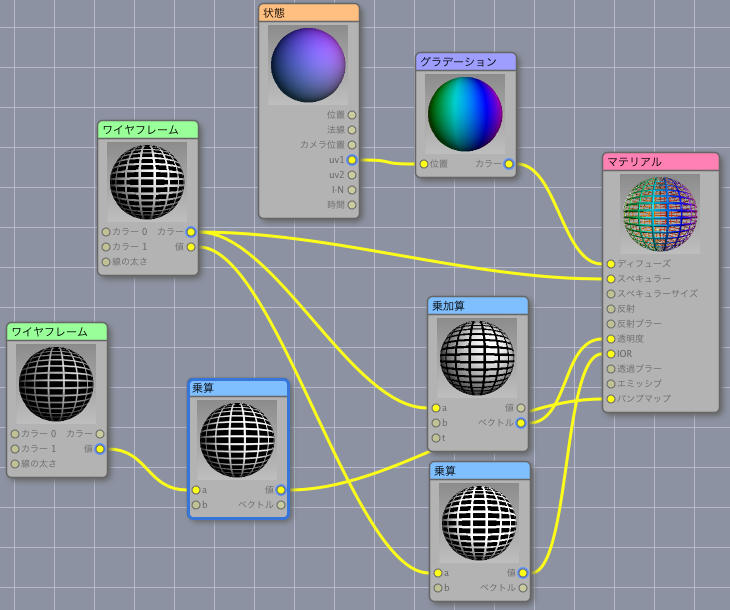
<p>ノードエディタはこんな感じ。<br />
ワイヤの色はディフューズに、グラデーションを設定しています。</p>
<p>
<img src="http://www.tres-graficos.jp/blog/resources/ch_20111005_wireMaterialSS.png" width="730" height="610" alt="ch_20111005_wireMaterialSS.png" />
</p>
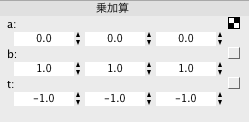
<p>ワイヤフレームテクスチャの白黒を反転させる乗加算ノードのパラメータはこんな感じ。</p>
<p>
<img src="http://www.tres-graficos.jp/blog/resources/ch_20111005_wireMaterialSS_p1.png" width="249" height="122" alt="ch_20111005_wireMaterialSS_p1.png" />
</p>
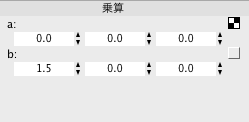
<p>IOR とバンプにそれぞれつないだ乗算ノードは、単に 1.5 をかけるだけ。</p>
<p>
<img src="http://www.tres-graficos.jp/blog/resources/ch_20111005_wireMaterialSS_p2.png" width="249" height="122" alt="ch_20111005_wireMaterialSS_p1.png" />
</p>
<p>バンプ用のテクスチャは、少し丸みを付けたかったため複製したワイヤフレームテクスチャノードの線タイプパラメータをラウンドにして使用してます。バンプを使わなければ、ノード１枚を使い回せるので、線の太さの調整が楽になりますね。（書いていて思いつきましたが、ラウンドタイプのテクスチャから、白黒２値化すれば使い回しもできるなぁ…）</p>
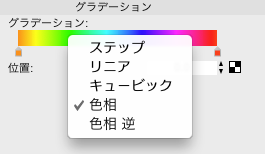
<p>小わざですが、スペクトラムのグラデーションは、両端２色を設定してグラデーションのタイプを色相（または色相 逆）に設定してやると簡単に作れます。グラデーションのタイプを変更するには、カラーバー上で右クリックしてください。</p>
<p>
<img src="http://www.tres-graficos.jp/blog/resources/ch_20111005_wireMaterialSS_p3.png" width="265" height="154" alt="ch_20111005_wireMaterialSS_p3.png" />
</p>
<hr />
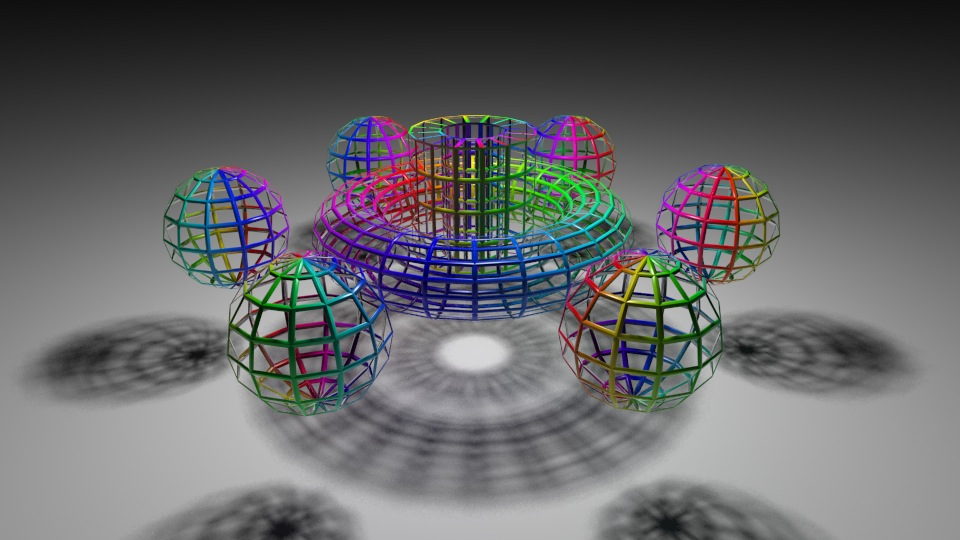
<p>金銀等メタルでワイヤを作りたい場合は、リフレクションのカラーを設定してみて下さい。</p>
<p>
<img src="http://www.tres-graficos.jp/blog/resources/ch_20111005_wireMaterial_metal.jpg" width="720" height="405" alt="ch_20111005_wireMaterial_metal.jpg" />
</p>

]]>
</content:encoded>
</item>

</rdf:RDF>