<?xml version="1.0" encoding="utf-8"?>
<?xml-stylesheet href="http://www.tres-graficos.jp/blog/rss/style.css" type="text/css"?>
<rdf:RDF xmlns="http://purl.org/rss/1.0/"
         xmlns:rdf="http://www.w3.org/1999/02/22-rdf-syntax-ns#"
         xmlns:content="http://purl.org/rss/1.0/modules/content/"
         xmlns:dc="http://purl.org/dc/elements/1.1/"
         xml:lang="en">
<channel rdf:about="http://www.tres-graficos.jp/blog/rss/1.0.php?id=440">
<title>TG BLOG</title>
<link>http://www.tres-graficos.jp/blog/index.php</link>
<dc:date>2007-07-24T17:27:17+0900</dc:date>
<description>
TG BLOG - RSS (RDF Site Summary).
</description>
<items>
<rdf:Seq>
<rdf:li rdf:resource="http://www.tres-graficos.jp/blog/article.php?id=440" />
</rdf:Seq>
</items>
</channel>
<item>
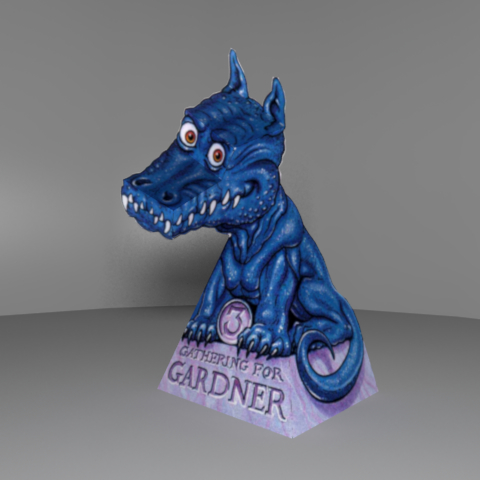
<title>Gathering for Gardner Paper Dragon with Cheetah3D</title>
<link>http://www.tres-graficos.jp/blog/article.php?id=440</link>
<dc:date>2007-07-24T17:27:17+0900</dc:date>
<description>某サイトで紹介されていたのを、Cheetah3D で作ってみた。
紙での作り方とテクスチャはこちらから
Cheetah3D の場合、Make Editable した Plane に UV タグの type: flat で型紙テクスチャを当て...</description>
<content:encoded>
<![CDATA[
<p>某サイトで紹介されていたのを、Cheetah3D で作ってみた。</p>
<p>紙での作り方とテクスチャは<a href="http://pontomidia.com.br/ricardo/greatweb/gathering_for_gardner_paper_dragon.html" class="ex-ref">こちら</a>から</p>
<p>Cheetah3D の場合、Make Editable した Plane に UV タグの type: flat で型紙テクスチャを当てておいて、Scalpel で、要らない部分を削除、折り目の部分もポリゴンを分割、組み立てる前に、UVタグで UV を save 。後は、Edge Rotate で曲げて作成。最後に Shell で厚みを付けてます。</p>
<p>
<img src="http://www.tres-graficos.jp/blog/resources/ch_20070724_bdpc.jpg" width="480" height="480" alt="" />
</p>
<p class="spec">Modeling & Rendering: Cheetah3D 4.2</p>
<p>ペパークラフト系のものは、結構手軽に作れますね。</p>
<hr />
<p>Cheetah3D のファイルは、<a href="http://www.cheetah3d.de/forum/showthread.php?p=13666" class="ex-ref">forum</a> に上げておくので、興味がある方は落として、ぐりぐり回してみてください。（裏側は結構適当 :-P ）</p>

]]>
</content:encoded>
</item>

</rdf:RDF>